SCE.com Scheduled Maintenance
A scheduled maintenance will be in place from 10.00 p.m. on Dec. 13 to 6.00 a.m. on Dec. 14. We appreciate your patience and understanding.
Will I qualify for bill forgiveness if I was impacted by the fires?

Submitted by candace.loyads on
Priority
7
FAQ Answer

Customers that have sustained 50% or more damage from the recent wildfires and wind events are considered eligible for bill forgiveness. Communications to eligible customers are scheduled to begin the week of March 10, 2025. You will receive a letter sent to the email or mailing address connected to your SCE account. If you have multiple accounts connected to the same email address, a letter will be sent to your mailing address for each eligible account.

Smartling languages
0

How do I request a payment arrangement?

Submitted by candace.loyads on
Priority
3
FAQ Answer

Requesting a Payment Arrangement

Eligible SCE customers can explore payment arrangement options online through My Account. Instructions vary by account type.

Single Account

If you have a single customer account, you can request a payment arrangement directly from the account balance section in My Account or by using the link below.
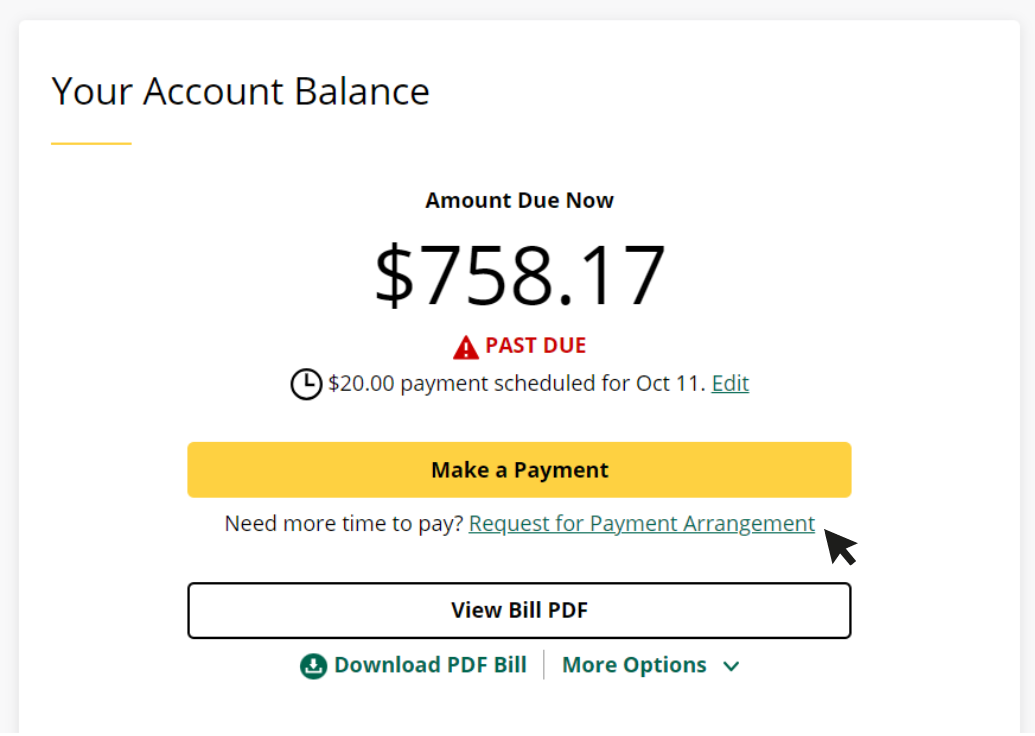
Request Payment Arrangement >

Screenshot of single account balance

Multi-Account

If you manage multiple accounts, log in and select the appropriate account to request a payment arrangement.
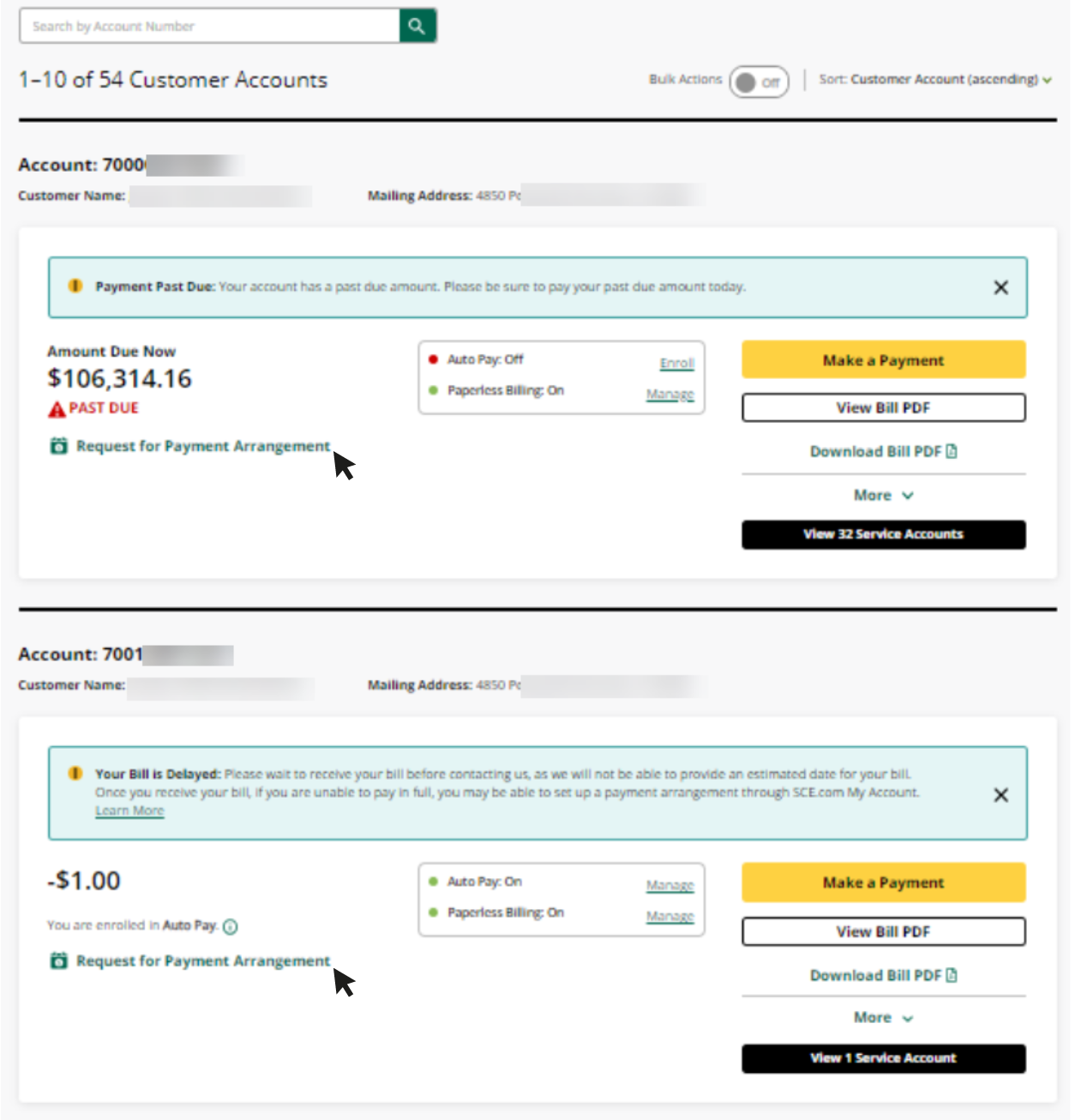
Login to My Account >

Screenshot of multiple account balances

Eligibility Requirements

Most customers can extend their due date or make payment arrangements. However, the following are not eligible:

  • Accounts scheduled for disconnection today
  • Accounts already disconnected for non-payment
  • Customers enrolled in the Arrearage Management Plan (AMP)
  • Accounts with returned checks and fees
  • Customers enrolled in the Budget Billing Plan (BBP)

Learn more about how payment arrangements work >

Smartling languages
0

What is the Budget Billing Plan?

Submitted by candace.loyads on
Priority
2
FAQ Answer

The Budget Billing Plan Replaced the Level Pay Plan

The Budget Billing Plan allows eligible SCE customers to spread the cost of their annual electricity usage into 11 equal monthly payments. This helps manage monthly expenses but does not reduce your total energy charges — you are still responsible for the full amount of electricity used.

How Does the Budget Billing Plan Work?

SCE calculates your monthly base amount by totaling your past 12 months of usage and dividing by 11. For the first 11 months, you pay this base amount. In the 12th month, you receive a "settlement bill" to reconcile your actual usage:

  • If you used less than expected, you may see a credit.
  • If you used more than expected, the balance will be due.

Eligibility Requirements

To qualify for the Budget Billing Plan, your account must meet these conditions:

  • Base monthly amount must be at least $5.
  • Account must be active with at least one active or pending contract.
  • Must be in an eligible rate category (see below).
  • Cannot be on hold or under Revenue Services Organization (RSO) review.
  • Cannot be under credit review (e.g., returned checks, disconnection, or multiple extensions).
  • Cannot be enrolled in both Budget Assistant and Budget Billing Plan.
  • Cannot be enrolled in Net Energy Metering (NEM).
  • For joint billed accounts, all contracts must be enrolled in BBP.

Eligible Rate Categories

  • D-CARE / D-CARE-SDP
  • DE / DE-SDP
  • D-FERA
  • DM
  • Domestic
  • MB-E (Medical Baseline Exemption)
  • TOU-D-4
  • TOU-D-5
  • TOU-D-PRIME
  • TOU-D-T / TOU-CARE
  • TOU-GS-1

Note: Community Choice Aggregation (CCA) accounts are eligible. NEM accounts are not.

How to Enroll

To apply, call the automated enrollment line at 1-800-434-2365, Monday through Friday, 8 a.m. – 6 p.m.

For more information, view the Budget Billing Plan FAQ .

Smartling languages
0

Who else can make a payment to my service accounts?

Submitted by candace.loyads on
Priority
1
FAQ Answer

Guest Payments to Service Account(s)

Anyone can make a payment on behalf of a Southern California Edison (SCE) customer by using the self-service electronic payment system.

To make a guest payment, the payer must provide the following information:

  • Customer of Record’s name (first and last)
  • Customer Account Number
  • Billing ZIP Code

Pay as a Guest

Smartling languages
0

How do I update my email for paperless billing?

Submitted by candace.loyads on
Priority
4
FAQ Answer

Update Your Email for Paperless Billing

  1. Log in to SCE Account.
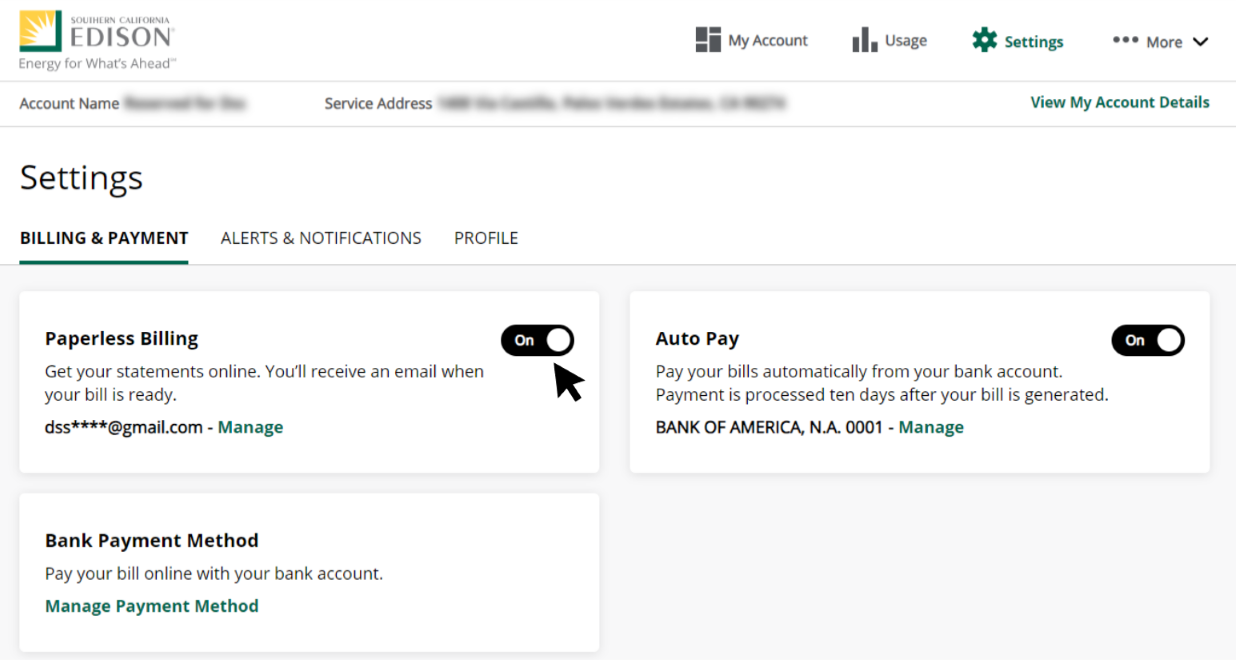
  2. Select “Settings” from the top navigation menu and click “Manage” next to your email address.
Screenshot 1
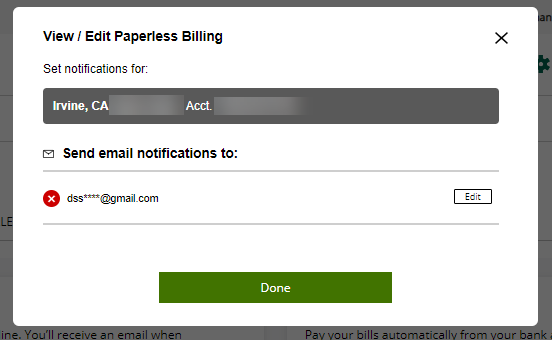
  1. A pop-up will be displayed. Click “Edit” to update the email linked to your paperless billing notifications.
Screenshot 2
  1. Click Save and Done to complete the update.
Smartling languages
0