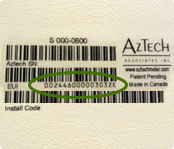
Where can I find the Device ID on my device?

Submitted by jonathan.markowskids on
Priority
17
FAQ Answer

The Device ID can also be referred to as the MAC Address or EUI 64. It is a 100% unique ID and is needed to securely register the device to the SCE smart meter. This information is typically found on the back of the device and some manufacturers display this information within the device menu.

null

Smartling languages
0

Where can I find the Device ID on my device?

Submitted by jonathan.markowskids on
Priority
16
FAQ Answer

You don’t have to be at your home or business when you submit the device registration request, but you do need to make sure your device is plugged in, ready for connecting (some devices need to be placed in “connecting” mode), and within 75 feet of the SCE smart meter before you submit your request. Please also have the following information handy:

  • Device ID
  • Device Install Code
  • Manufacturer Name
  • Device Model

Once your request has been successfully submitted, your device registration should be complete within 24 hours.
To get started, visit My Account and click on the Device Registration tab.

Smartling languages
0

Can I call to register my device?

Submitted by jonathan.markowskids on
Priority
15
FAQ Answer

To protect your confidential information, we require that you submit your device registration requests in writing, either online or by completing a paper application.

The fastest way to submit your device registration is to visit the HAN webpage on SCE.com.

If you would like to submit a paper application, just print the Device Registration Application , complete all required fields, sign it, and return it to us (see detailed instructions on the form). Once we process your application, contact us at HANQuestions@sce.com to register your device. We recommend waiting at least 5 business days before calling. When you call, please have the following information handy:

  • Device ID
  • Device Install Code
  • Manufacturer Name
  • Device Model

You will also need to turn the device on, ensure it’s ready for registration, and located within 75 feet of the SCE smart meter. You don’t have to be at your home or business when you call—just make sure you have the device information with you.

Smartling languages
0

How do I register my device?

Submitted by jonathan.markowskids on
Priority
14
FAQ Answer

Visit the HAN webpage on sce.com: https://www.sce.com/residential/rebates-savings/hanlogin . Click on the HAN enrollment form link and submit your enrollment request. You don’t have to be at your home or business when you submit the device registration request, but you do need to make sure your device is plugged in, ready for connecting (some devices need to be placed in “connecting” mode), and within 75 feet of the SCE smart meter before you submit your request. Please also have the following information handy:

  • Device ID
  • Device Install Code
  • Manufacturer Name
  • Device Model

Once your request has been successfully submitted, your device registration should be complete within 72 hours.

Smartling languages
0

Can residential and business customers register a device?

Submitted by jonathan.markowskids on
Priority
13
FAQ Answer

Yes. residential and small business customers who meet the eligibility requirements can register a device and receive many of the same benefits. For eligibility requirements see question, What are the eligibility requirements to register a device?

Smartling languages
0

What are the eligibility requirements to register a device?

Submitted by jonathan.markowskids on
Priority
12
FAQ Answer

To register a device to the SCE smart meter, you must have:

Your device must be located within 75 feet of the smart meter to enable communications between your device and the SCE smart meter.

Please contact us at HANQuestions@sce.com

Smartling languages
0

What are the benefits of registering a device to the SCE smart meter?

Submitted by jonathan.markowskids on
Priority
11
FAQ Answer

Once a device is securely registered to the SCE smart meter, it may enable you to:

  • View near real-time energy usage information such as kilowatt hours (kWh) and kilowatts (kW) demand.
  • See how small changes in energy usage behavior, such as raising the temperature on your air conditioner or turning off lights can lower your energy usage and potentially your monthly electricity bill.
  • Enroll in Save Power Day Incentive Plus. The day prior to an event, we will send a Save Power Day event notification to your device. During the event, if you reduce your energy usage to below your average level during the event, you may qualify to receive a bill credit of $1.25 for each kWh reduced. For program details and eligibility requirements, please see the Save Power Day Incentive Plus FAQs


Smartling languages
0

Has SCE tested devices to determine if they are compatible with the SCE smart meter?

Submitted by jonathan.markowskids on
Priority
10
FAQ Answer

An individual’s magnetic field exposure varies throughout the day and depends on multiple factors including field levels in the home, vehicle, and workplace, as well as appliance use. Researchers from the Electric Power Research Institute (EPRI) surveyed 992 American homes in 1993 and found an all-room average magnetic field of 0.9 mG, though background field levels in some rooms exceeded 16 mG.

A follow-up EPRI study in 1998 characterized the 24-hour, personal magnetic field exposures of over 1000 people. An average 24-hour personal exposure of 1.25 mG was reported, with a small number of people having average exposures over 10 mG.

Your connected network devices can communicate with each other and share information over the internet, Wi-Fi, Z-Wave, and ZigBee. Your network can also enable the SCE smart meter to communicate with registered ZigBee Smart Energy Profile 1.0/1.1 devices to deliver energy usage information in near-real-time.

There are several types of devices on the market today. These include energy information displays, USB dongles, gateways, smart thermostats, and smart appliances. To successfully connect with the SCE smart meter, your device must support ZigBee communications and be Smart Energy Profile 1.0 or 1.1 certified.

Yes, we’ve developed a Home and Business Area Network Testing Laboratory to thoroughly evaluate products and devices for compatibility with the SCE smart meter. View compatible devices. 

Smartling languages
0

What is a smart appliance?

Submitted by jonathan.markowskids on
Priority
9
FAQ Answer

In addition to the standard features of an appliance, a smart appliance can receive energy related information such as near real-time energy usage in kilowatt hours (kWh) and kilowatt demand (kW), energy pricing and cost information, text messages from the smart meter, as well as notifications to automatically reduce energy usage in your home (notifications require program enrollment). Device capabilities vary depending on the manufacturer and model.

Smartling languages
0

What is a smart thermostat?

Submitted by jonathan.markowskids on
Priority
8
FAQ Answer

A smart thermostat does everything a standard central air conditioner thermostat does and more. It can receive energy related information such as near real-time energy usage in kilowatt hours (kWh) and kilowatt demand (kW), energy pricing and cost information, text messages from the smart meter, as well as notifications to automatically reduce energy usage in your home (notifications require program enrollment). Device capabilities vary depending on the manufacturer and model.

Smartling languages
0