Having Trouble Signing In?
Multi-factor authentication, or MFA, is now required when you sign in to SCE.com My Account. You may be asked to enter a security code, sometimes called a PIN, sent to an available email address or phone number.
If you are not receiving your security code or your user ID has been locked, follow the steps below.


Still need help?
If you cannot receive a security code, cannot access the email associated with your user ID, or remain locked out after completing the steps above, contact Customer Support at 1-800-284-2365.

Multi-Factor Authentication (MFA) Preguntas Frecuentes
Multi-Factor Authentication (MFA) FAQ
Yes, you can disable MFA anytime through the “Settings” section in SCE.com My Account. Please note that if you disable MFA, you will be offered the option again the next time you decide to manage your payment method online.
MFA is an added layer of security that helps protect your account. After entering your password, you'll verify your identity using a security code sent to your selected verification method, such as a text message, voice call, or email. This extra step helps keep your account and personal information secure, even if your password is compromised.
When you log into your SCE.com account, we will send a one-time security code to your selected verification method to enable MFA. Moving forward, you’ll be prompted to enter a new security code, through the verification method you chose, to verify your identity each time you log in.
You can choose to receive your code by:
- Text message (SMS)
- Voice call
Important: Your security code is for your use only. Do not share it with anyone, even if they claim to be from Customer Service.
Yes. To help keep your account secure, a new security code is generated each time you log in and sent to your selected verification method.
Yes. You can update your preferred verification method anytime in Profile Settings.
Passwords alone are no longer enough to protect against many common online threats. MFA provides an added layer of security that helps prevent unauthorized access to your account, even if someone obtains your password. This security enhancement is part of SCE's ongoing effort to help protect customer accounts and personal information.
To protect your account, you must have access to at least one verification method in order to complete sign in.
If you no longer have access to the phone number or email address associated with your account, contact Customer Support. A representative will help verify your identity and discuss available options for restoring access to your account.
For security reasons, account recovery may require additional verification before changes can be made.
If you receive a security code that you did not request, do not share the code with anyone and do not use it to complete a sign-in attempt. Receiving an unexpected code may mean that someone entered your username or password and attempted to access your account.
We recommend that you:
- Do not provide the code to anyone.
- Change your password as soon as possible.
- Contact Customer Support if you continue receiving unexpected security codes or have concerns about your account's security.
Important: SCE will never contact you and ask you to provide a security code.
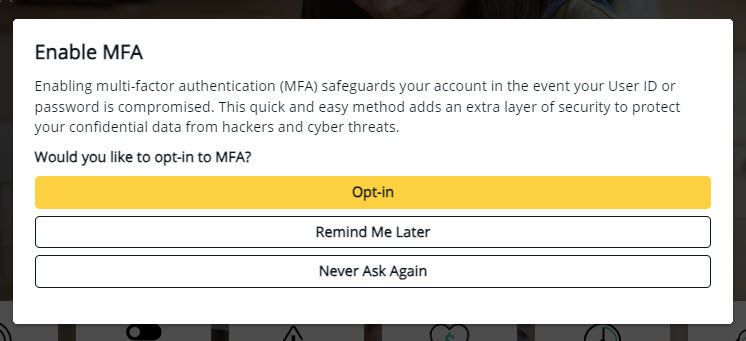
When you log into your SCE.com My Account, you will see a prompt to enable MFA. You can choose to:
- Opt In: Select a phone number from the drop-down menu, or add a new one, and choose to receive verification codes by text or phone call.
- Remind Me Later: You will be prompted again on your next login.
Never Ask Again: You will no longer be prompted to enable MFA, but you can opt-in later in the “Settings” section in your SCE.com My Account.
If you're unable to complete MFA verification and access your account, please contact Customer Support at 1-800-284-2365. Support is available Monday-Friday, 7:00 AM-7:00 PM, and Saturday, 8:00 AM-5:00 PM.
¿Esta información le resultó útil?

- Cambiar el nombre en Mi cuenta
- How do I change my language preferences?
- Close My Account
- Customer Information Service Request (CISR) FAQs
- How do I complete multi-factor authentication (MFA)? - Current Customer
- Gestión de alertas y preferencias
- How do I update my contact information?
- ¿Cómo actualizo o cierro una cuenta de SCE debido al fallecimiento del titular de la cuenta?
- I'm not receiving my security code?
- Multiple Customer Accounts Help
- Managing Over 10 Service Accounts
- What's New in My Account
- SCE.com Redesigned for You
- Where can I find my Customer Account Number?