

Why can't I access My Account?
If you’ve forgotten your password, you can reset it in just a few steps.
- Visit the Reset Your Password page directly or
- Click the "Forgot Password?" link within the log in module from the SCE home page
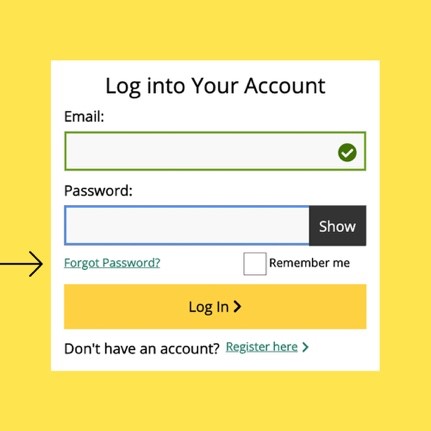
If you’re authorized to use an SCE account but still can’t log in, try the following quick fixes:
- Clear Your Browser History
- Delete cookies and cache from your internet browser.
- Restart Your Browser
- Close all browser windows completely, then reopen a fresh one.
- Use a Direct Link
- Type SCE.com into your browser bar instead of using a bookmark.
These steps often resolve the most common access issues.
Was this information helpful?

Related Questions
- Change Name on My Account
- Change Language Preferences
- Close My Account
- Customer Information Service Request (CISR) FAQs
- Enabling Multi-Factor Authentication (MFA)
- Managing Alerts & Preferences
- Update Contact Information
- How do I update or close an SCE account due to the death of the account holder?
- I'm not receiving my security code?
- Managing Multiple Customer Accounts
- Managing Over 10 Service Accounts
- Multi-Factor Authentication (MFA) FAQs
- New Features in My Account
- SCE.com Redesigned for You
- Where can I find my Customer Account Number?